What I Built Next — Part 2 | The Homelab Rabbit Hole
September 16, 2026 in What I Built Next | 12 mins read | Tagged: personal business developmentIt started with a weird little computer in a thrift shop. I didn’t need it. Which, as anyone who likes computers knows, is rarely a good enough reason not to buy one. It was a tiny ARM-based computer called a Firefly Station P1 Pro. I’d never seen one before, it was cheap, still new in the box, and naturally I thought:
“I wonder what I can do with this?”
That question turned out to be expensive. Not necessarily in money. Most of my homelab has been built from old, second-hand or repurposed hardware. It was expensive in time. And sleep. And occasionally sanity.
The little ARM machine that started everything
The Station P1 Pro became my first proper homelab machine.
It is based on an ARM64 architecture, with Gigabit Ethernet and support for M.2 NVMe storage. Mine was running Ubuntu, and compared with the servers people normally show off in homelab communities, it was hardly intimidating.
That was part of the appeal. I wasn’t trying to build a data centre. I wanted to see how much useful infrastructure I could squeeze out of a small computer that had essentially been abandoned in a thrift shop. So I installed Docker. And that was the beginning of the problem. Because once you successfully self-host one application, you immediately discover another application you could self-host. Then another.
Then you start thinking: “Why am I using that cloud service at all?”
Docker all the things
Docker became the foundation of the lab. Instead of installing applications directly onto the operating system, I could run services in containers, experiment with them, break them, delete them and start again without completely destroying the host machine. At least, that was the theory. Over time, the little Firefly started running an increasingly ridiculous collection of services.
There was AdGuard Home for network-wide DNS filtering.
Vaultwarden gave me a self-hosted Bitwarden-compatible password vault.
Paperless-ngx became a place for scanning, organising and searching documents.
Memos provided a lightweight personal notes system.
code-server gave me VS Code through a browser.
Portainer helped manage the growing collection of Docker containers.
Homepage eventually became the dashboard tying everything together.
Then came media services, MQTT, Home Assistant integrations and various experiments that survived anywhere from several months to approximately eleven minutes. The Firefly had stopped being a weird little computer. It had become infrastructure.
Then came DNS
Typing IP addresses and port numbers gets old remarkably quickly.
Something like: 192.168.x.x:8088 might be perfectly functional, but it doesn’t exactly feel like your own private cloud.
So I started using AdGuard Home for local DNS. Instead of remembering addresses, I could create names such as:
vault.home.lan
home.home.lan
music.home.lan
ha.home.lan
Now the services started to feel like part of an actual environment rather than a collection of containers scattered around the network. This also introduced me to an important principle of homelabbing: Every problem you solve unlocks a more complicated problem.
Because now that I had nice domain names, obviously I needed HTTPS.
Enter Traefik
I added Traefik as a reverse proxy. Instead of exposing a different port for every service, Traefik could receive requests and route them to the correct application based on the hostname.
A request for: vault.home.lan could go to Vaultwarden. A request for: music.home.lan could go to the music server. And so on.
Conceptually, it was beautiful. DNS knew where things lived. Traefik knew which application should receive the request. Docker ran the applications. For a brief moment, I felt like I knew what I was doing. Then I decided everything should have HTTPS.
Certificates: where confidence goes to die
Public websites have a relatively straightforward certificate story. Private domains are different. My .home.lan domains only existed inside my network, so a public certificate authority couldn’t simply validate them. I experimented with locally generated certificates and trusted certificate authorities. This worked surprisingly well — until it didn’t.
A laptop might trust the certificate. A phone might not. A browser might be perfectly happy while an app complained. Vaultwarden was particularly useful for discovering just how many different ways TLS could ruin an otherwise pleasant evening. It was also a useful lesson. Security isn’t just about enabling HTTPS. Certificate trust, DNS, application behaviour, operating systems and network boundaries all interact.
The green padlock is the end result of quite a lot happening underneath.
Home Assistant joins the party
At some point, the homelab also became connected to the house. I had already been experimenting with smart-home devices, so Home Assistant naturally became part of the infrastructure. Lights, cameras, televisions, thermostats, locks, sensors and other devices gradually started talking to one system. This is where the project changed for me. The homelab wasn’t just hosting applications any more. It was interacting with the physical environment. And because I prefer local control wherever practical, self-hosting Home Assistant made much more sense to me than building a house entirely dependent on somebody else’s cloud staying available.
Home Assistant has moved around the lab during its lifetime, including experiments with virtualisation, before eventually returning to dedicated Raspberry Pi hardware.
That sentence makes the process sound considerably more deliberate than it actually was.
The Firefly starts running out of fire
Eventually I reached the obvious limitation. The Station P1 Pro was never designed to become my personal cloud platform. ARM64 also occasionally made life interesting because not every container, package or random project on GitHub supported the architecture equally well.
More importantly, I wanted somewhere safer to experiment with virtual machines and infrastructure without putting everything on one little Ubuntu installation. So another second-hand machine entered the story: a Lenovo ThinkCentre M73 Tiny. It has an Intel Core i5-4570T, 8 GB of RAM and a 240 GB SSD. Again, nothing spectacular. And that is precisely what I like about it.
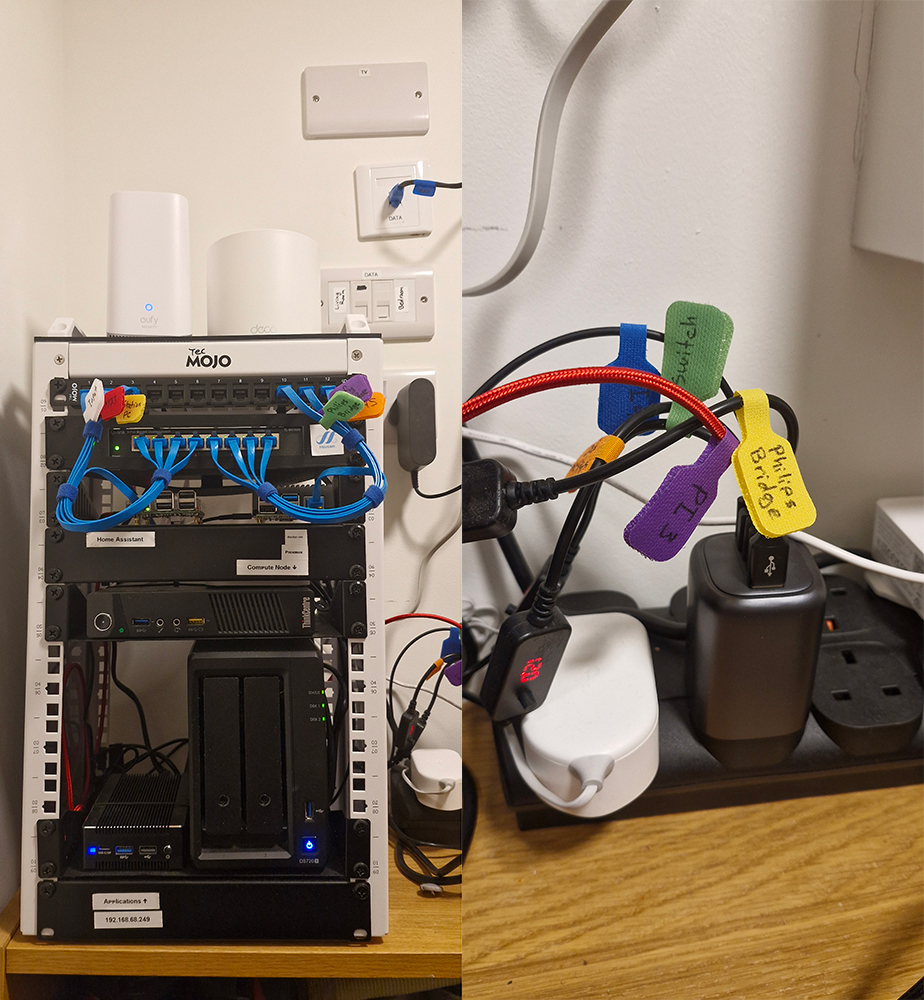
One plug to power them all
As the homelab grew, I discovered another problem that had nothing to do with Docker, networking or Linux. Power adapters.
Every little device came with its own power brick. Before long, I had five different adapters occupying sockets, creating cable clutter and generally making my supposedly neat little homelab look like something I’d assembled behind a television in 2004. This annoyed me far more than it probably should have.
So I started looking at the actual power requirements of each device and realised I didn’t necessarily need five separate power supplies. What I needed was one sufficiently capable USB-C power supply and the right cables.
Some of the machines weren’t designed for USB-C power at all, so I used USB-C Power Delivery trigger cables that negotiate the required voltage from the charger and present it through the connector the device expects. An example of the cable can be found by clicking here.
Eventually, five power adapters became one power supply and a handful of USB-C cables.
I was ridiculously proud of this. Not installing Proxmox. Not configuring Docker. Not getting DNS, Traefik and HTTPS talking nicely to each other. The cables.
There is something deeply satisfying about looking behind a collection of computers and seeing one power supply where there used to be five chunky adapters fighting for space. It also became another small example of what I enjoy about the homelab: the solution didn’t require buying newer computers. It required understanding what the hardware actually needed and finding a cleaner way to provide it. And, perhaps most importantly, I can now look behind the desk without becoming annoyed.
Proxmox changes the architecture
I installed Proxmox on the ThinkCentre. This was probably the point where my collection of self-hosted applications officially became a homelab. Instead of thinking purely in terms of: machine → Docker → containers
I could think in layers: physical hardware → hypervisor → virtual machines → Docker → applications
Docker services could live inside their own VM. Infrastructure could be separated. Machines could be rebuilt without necessarily rebuilding everything else. Experiments became easier. Mistakes became slightly less terrifying.
The M73 gradually took over responsibilities from the Firefly, particularly the services that made more sense on x86 hardware. I also standardised the Docker applications under directories such as: /opt/docker/vaultwarden
That sounds like an insignificant detail. After you’ve accumulated enough containers, configuration files, volumes and experiments, it absolutely isn’t.
Organisation becomes infrastructure too.
Remote access without opening the front door
The next problem was accessing everything when I wasn’t at home. The obvious traditional answer would have been port forwarding. I didn’t particularly like that answer. I wanted remote access without publicly exposing my internal services. So I started using Tailscale.
Tailscale creates a private network between authorised devices using WireGuard underneath. My laptop, phone and homelab machines can effectively behave as though they are on the same private network even when I’m away from home.
This solved several problems at once. I could remotely administer the lab. I could access internal applications. I could use a machine at home as an exit node when I wanted my traffic to leave through my home connection.
More recently, Tailscale Serve also gave me a much cleaner answer to some of my HTTPS problems. For example, Vaultwarden could be available through a private Tailscale HTTPS address with a valid certificate, without exposing it to the public Internet. After spending far too much time fighting private certificates, this felt almost suspiciously easy.
Apparently, now I can take a Raspberry Pi when traveling, the PI automatically connects to my home through Tailscale when booted, and it serves as my Travel Wireless Router. I am always surfing the web from inside my house!
Storage becomes another rabbit hole
Applications inevitably create data. And media creates lots of it. I added external storage and started experimenting with a self-hosted music setup using tools including Navidrome and Lidarr.
Then one of the drives started producing read-only behaviour and I/O errors. Because apparently my homelab believed I hadn’t learned enough about storage yet. That experience pushed storage higher up my priority list and started another round of research into NAS systems, redundancy, backups and where data should actually live. This is the point where you discover that RAID isn’t a backup. Then you discover that knowing RAID isn’t a backup doesn’t magically mean you have a good backup strategy. There is always another rabbit hole.
What the architecture looks like now
The original Firefly hasn’t disappeared, but the architecture has evolved considerably.
The ThinkCentre M73 runs Proxmox and provides the main virtualisation environment.
A Docker VM hosts many of the containerised services.
Traefik handles routing for internal web applications.
AdGuard Home provides DNS and local hostname resolution.
Tailscale provides private remote connectivity.
Home Assistant has returned to dedicated Raspberry Pi hardware.
External storage currently handles media while I work towards a more permanent NAS setup.
And spread across all of this are applications such as Vaultwarden, Paperless-ngx, Memos, Homepage, Navidrome, code-server, Portainer and whatever I happen to be experimenting with that week. None of this was designed upfront. It evolved. That might actually be the most important part of the project.
I broke a lot of things
The neat architecture diagram is always the final version.
It doesn’t show the hours spent wondering why one computer resolves a hostname while another doesn’t.
It doesn’t show certificates that work in the browser but fail in an app.
It doesn’t show containers that have perfectly good Docker images — just not for ARM64.
It doesn’t show drives suddenly becoming read-only.
It doesn’t show services being moved from one machine to another because the original architecture stopped making sense.
And it definitely doesn’t show the moment when you realise the problem you’ve spent an hour debugging is caused by a typo.
But that’s where most of the learning happened.
The cheapest laboratory I’ve ever owned
Professionally, I’ve worked with software and systems considerably larger than anything sitting in my house. But there’s something different about building your own infrastructure. There is no infrastructure team. No network team. No security team. No storage team. No person to raise a ticket with. DNS isn’t working? Congratulations. You’re the DNS team. Docker won’t start? You’re DevOps. The certificate expired? Security team. The disk is making concerning noises? Storage team. Home Assistant can’t see the television? Apparently you’re also consumer electronics support. A homelab forces you to cross boundaries that are normally separated into different roles. Networking leads to DNS. DNS leads to reverse proxies. Reverse proxies lead to TLS. Containers lead to storage. Storage leads to backups. Remote access leads to security.
And eventually you realise that the weird little computer from the thrift shop has become an excuse to understand how all those pieces fit together.
And I’m still building it
The lab isn’t finished.
I’m not sure a homelab can actually be finished.
I still want better storage.
I want cleaner separation between infrastructure and applications.
There are services I want to move, replace or remove entirely.
There are probably several architectural decisions I’m currently very pleased with that Future Me will consider completely ridiculous.
That’s fine.
The point was never to build the perfect server.
It was to experiment.
To reuse hardware.
To understand the systems underneath the services we normally take for granted.
And, occasionally, to spend six hours automating something that would have taken thirty seconds to do manually.
All because I walked into a thrift shop, saw a strange little computer and asked:
“I wonder what I can do with this?”
Quite a lot, apparently.